
Maintenance run by work orders. From QR code to spare-parts store.
For management, maintenance is often a black box: money goes out, but you can't see where or why. CMMS lines up assets, work and spare parts in a single record, so you know which machines eat the most hours and money, whether the team has the capacity for the plan and what is actually on the shelf.
Report a fault by scanning a QR · drag-and-drop planning · KPIs from maintenance codes · mobile and offline on the shop floor
Maintenance works hard. But without a system.
"Faults reported by word of mouth"
The operator calls the foreman, the foreman calls a technician. What broke, when and who fixed it can't be traced back later, and maintenance KPIs simply don't exist.
"The parts store in a notebook"
Spare parts are issued without records, nobody watches minimum levels and the critical part is always missing at the worst moment.
"Inspections in one calendar"
Statutory inspections and obligations are tracked by one person in Outlook. A missed deadline is discovered during an inspection.
CMMS brings machines, work, parts and inspections into a single cycle: every intervention is a work order with costs, every part has a movement and every inspection a deadline.
Not new screens. A different way of working.
Maintenance stops being a black box
Costs, hours and failure rates are visible per machine. The maintenance budget is defended with numbers, not gut feeling.
The work queue runs on priority, not volume
Requests go through triage and planning. Priority goes to what threatens production, not to whoever called last.
Repairs aren't blocked by a missing part
The store keeps what is actually consumed, and the system watches minimum stock.
Records for audits and insurers are at hand
The history of interventions, inspections and responsibilities is traceable for every machine.
What happens when maintenance gets data
"In half a year we achieved more than a 15% increase in overall production efficiency. Because we no longer chase delayed orders, the team is calm and in better spirits."
Figures are based on iDomino case studies and internal data from manufacturing projects, 2020 to 2026.
From request to closure. Nothing gets deleted.
What takes work off maintenance and adds oversight
You know what you own and what state it's in
An asset register over workplaces, stations and components, with a history of interventions, costs and documentation. Deciding whether to repair or buy new stops being a matter of feeling. (Asset register)
Anyone can report a fault in seconds
A QR label on the machine, a phone and you're done - no account, no training. The report reaches the maintenance queue with the machine identified, so it doesn't get lost passing through three people. (QR labels and fault reporting)
A work plan that fits real people
The capacity board calculates the pool of hours minus absences and a reserve for breakdowns. An overloaded week is visible in advance, not on Friday when half the tasks stay undone. (Capacity planning board)
Preventive maintenance based on real running
A trigger over a machine counter (running hours, cycles, pieces) creates an order on its own, with lead time and an optional calendar backstop. Machines that run little aren't serviced needlessly, and busy ones aren't overlooked. (Counters and preventive maintenance)
You see which machines fail repeatedly and why
Problem, cause and remedy codes turn repair notes into data. From them come failure-rate rankings, a basis for overhauls and an argument for investment. (Maintenance codes and KPIs)
The part is in stock, or you know when it arrives
An MRO store with movements, minimum stock and links to work orders. No more repairs stalled by a part everyone assumed was on the shelf. (Spare-parts store)
Parts purchasing has a trail and a budget
Orders, goods receipts and stocktakes linked to consumption on machines. Management sees how much maintenance costs and where the money ends up. (Purchasing and stocktakes)
Nobody misses an inspection deadline
Inspections and statutory obligations with deadlines, responsible people and a compliance overview. Records for inspectors and insurers are together, not in a binder. (Inspections and obligations)
The technician records at the machine, not at a desk in the evening
Reporting a problem queues up during a network outage and sends once it's back, the list of your own orders stays readable from a local copy, and you enter counter readings from the kiosk at the station. The technician spends time at the machines instead of on admin. (Mobile and offline)
Planning work with overload control
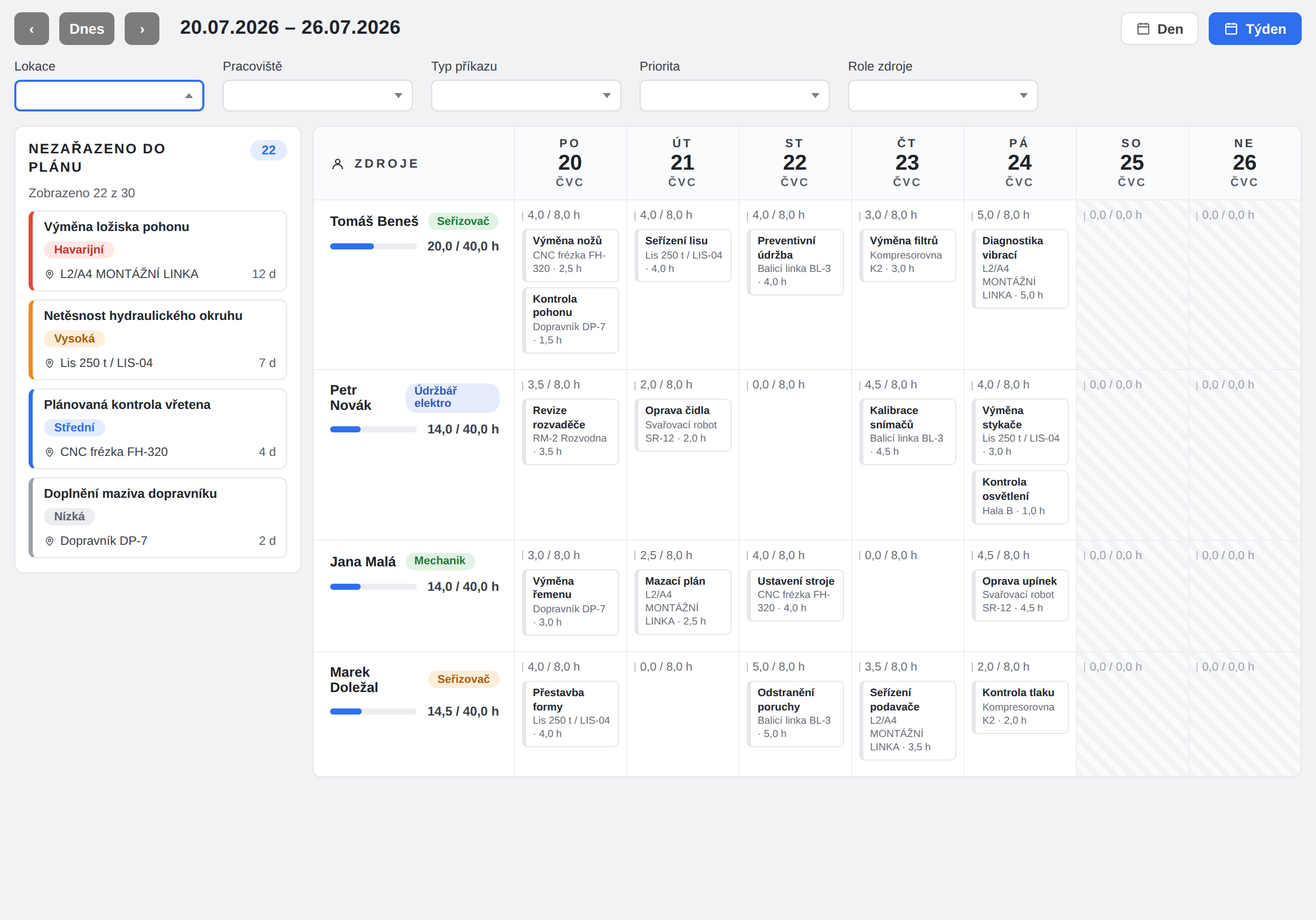
The planning board shows technicians, setters and external suppliers as capacity resources with a daily pool of hours. Work is planned by dragging a card onto a resource and a day.
- Pool − absences − reserve = plannable hours; against them, planned and reactive work adds up.
- The reactive reserve keeps room for breakdowns, so the preventive plan doesn't collapse with the first fault.
- Dragging a card = scheduling, moving between cells = rescheduling, back to the queue = cancelling the plan.
- Without planning permission, read-only: the board is visible, but changes are protected by role.
What each role gets out of it
Runs the team, the plan and the budget
- Request queue with priority and a technician capacity board
- Failure rates and costs per machine as a basis for investment
- Inspections and statutory obligations with deadlines and ownership
- Escalation levels for orders nobody has handled
Works at the machines and with parts
- Counter readings from the kiosk and problem reporting even during a network outage
- MRO store with minimum stock and links to work orders
- History of interventions for every asset in a couple of clicks
Needs the machines running
- Anyone can report a fault from a phone via a QR label
- You see the request status without calling maintenance
- Planned shutdowns meet the production plan
Defends the cost of maintenance
- Maintenance costs per machine and per plant, not one lump number
- Repair-or-replace decisions backed by history
- Records for insurers and inspectors traceable at the asset
Frequently asked questions
They complement each other. TPM engages operators: autonomous maintenance, checklists and fault reporting straight from production. CMMS runs the work of the maintenance department: work orders, capacities, the parts store and inspections. A report from TPM becomes a request in the CMMS queue.
The store (MRO) pages have strict permissions: not even an administrator gets in without an explicitly assigned store role. Reading, issuing (setter) and management (storekeeper) are separate, and orders and stocktakes have their own approval rights.
Reporting a problem, reading work orders and entering counter readings are designed to work offline too; once the network is back, the queue is sent. Store operations, orders, stocktakes and the planning board require a connection.
From triggers over counters. A trigger has an interval in units (e.g. every 500 running hours), a lead time in which the order is pre-generated, and an optional calendar backstop "or every X days", whichever comes first. The order is created from a maintenance template with a Plan (counter) origin, and the plans are visible on the asset card.
Yes. Inspection types, periodic asset obligations with deadlines, responsible people and results, and a compliance overview of fulfilment. Upcoming and overdue deadlines are highlighted on the asset card.
Escalation levels configured in the organisation kick in: after a chosen number of hours, from a chosen priority and optionally only for unassigned orders, maintenance administrators or specific people are notified step by step. An order can also be promoted from escalation into the action plan, where it gets a responsible person and a deadline.
Maintenance KPIs and asset costs: a breakdown into labour, parts and external services, indicators over replacement value (cost / RAV % per year) and MRO stock analytics. Labour rates are visible only to roles with permission for sensitive data.
We'll set it up on a single machine of yours
Book a no-obligation online demo. We take one of your machines, create the asset, print a QR label, report a fault from a phone and walk it all the way to a closed work order with costs and consumed parts.